Find inspiration on where to travel next — and the cheapest flights going anywhere — with Skyscanner’s Everywhere Search.
How to use Skyscanner’s Everywhere Search
Search for the cheapest flight going anywhere by following these four easy steps.
Go to Skyscanner or open the app.
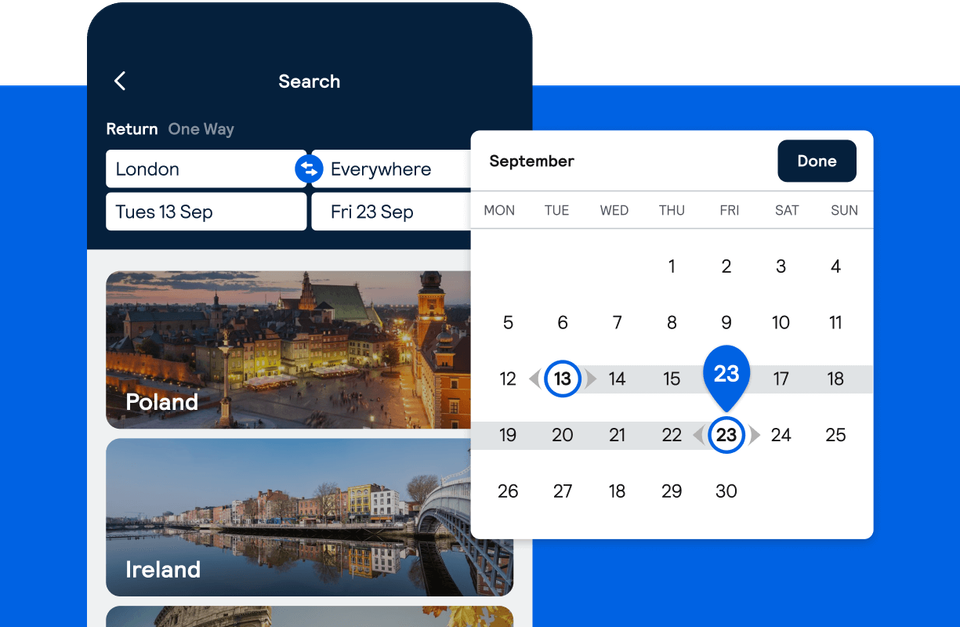
Type in your local airport, or even an entire country for even more flexibility and prices.
Type “Everywhere” into the next box (you’ll find this in the drop-down list too).
Choose your dates. If you’re flexible, search by “Whole month” to see when’s the cheapest time to fly (vacay cocktails won’t pay for themselves).
“As a frequent flyer, finding great-value flights is always top of the agenda. The ease of using the Everywhere search tool takes all the stress out of booking tickets and with a bit of flexibility.”
World Traveller & Blogger, Dan Flying Solo
Tip 1. Filters aren’t just for holiday snaps
Once you’ve seen all the possibilities, find the one with filters. Try “direct flights only” or “one-way,” the “Best, Cheapest, Fastest” routes, “add nearby airports” for more flexibility, or search “multi-city” stops for a longer trip. That way, you’ll discover destinations you didn’t think of for prices that’ll surprise you.

Tip 2. Find the best price for you
Don't worry if your departure and return dates aren't set. You can find your ideal destination and dates by selecting "Flexible dates" and then choosing a whole month for departure and return. We'll show you the lowest flight prices from the entire month(s) you choose.

Tip 3. Check hotel rates before you book
You've found the cheapest flight going anywhere your heart desires, but make sure that hotel rates are within your budget for the dates you found. Switch to hotels and search your destination and travel dates to find the perfect stay for your trip.

For the cheapest flights, combine "Everywhere Search" with flexible dates like mid-week departures or off-peak seasons.
Want to read more?
Set up a Price Alert for a route you like and we’ll let you know when the price changes
Learn how to use Skyscanner’s multi-city search to plan trips across multiple destinations in one booking